Resume screening you can explain
Write down what good looks like for the role once. Anuva scores every application against it the same way, shows the points behind each score, and waits for a person to decide.
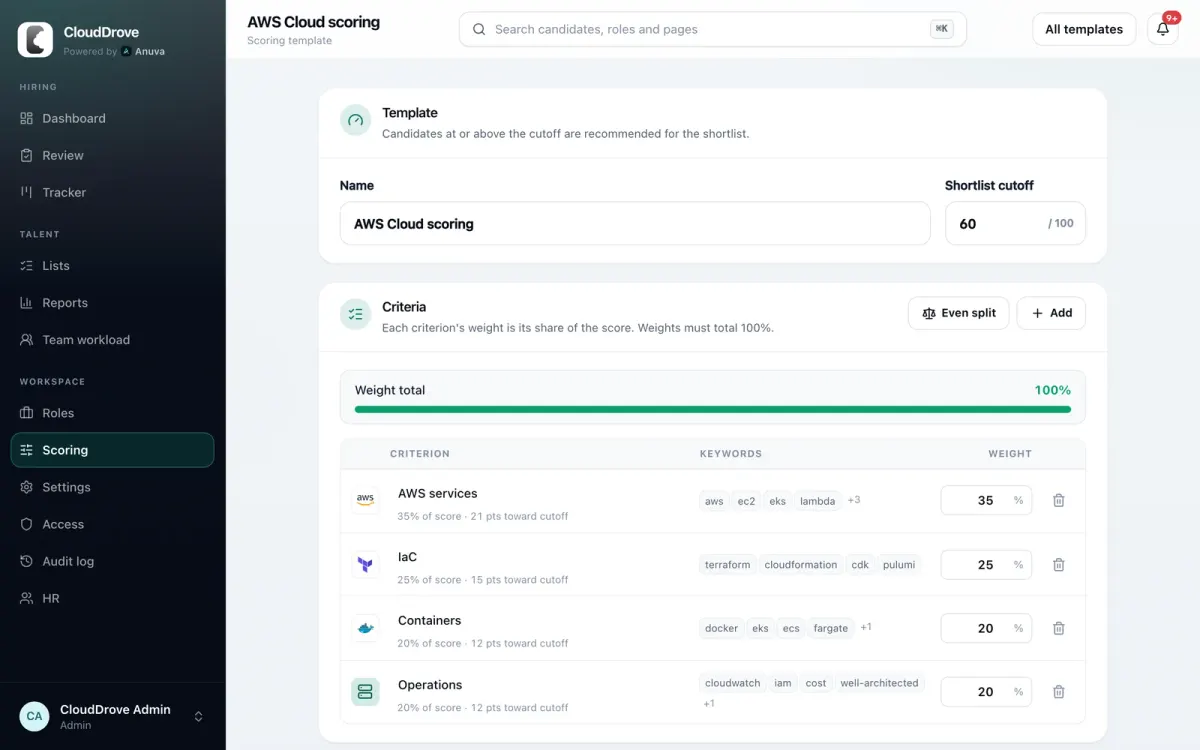
Scoring templates: criteria, weights, cutoff
A template is a list of criteria, each with keywords and a weight. Weights must add up to 100 percent, and the editor shows the running total. The cutoff decides who is recommended for the shortlist and who needs a review.
- Reuse a template across roles, or build one from the job description when you save a role.
- Each scoring run keeps a snapshot of the template, so an old score can always be reproduced.
- Checks and flags never change the numeric score.
The per-criterion breakdown
Open any candidate and the score is broken down by criterion. Nothing is hidden behind a single number.
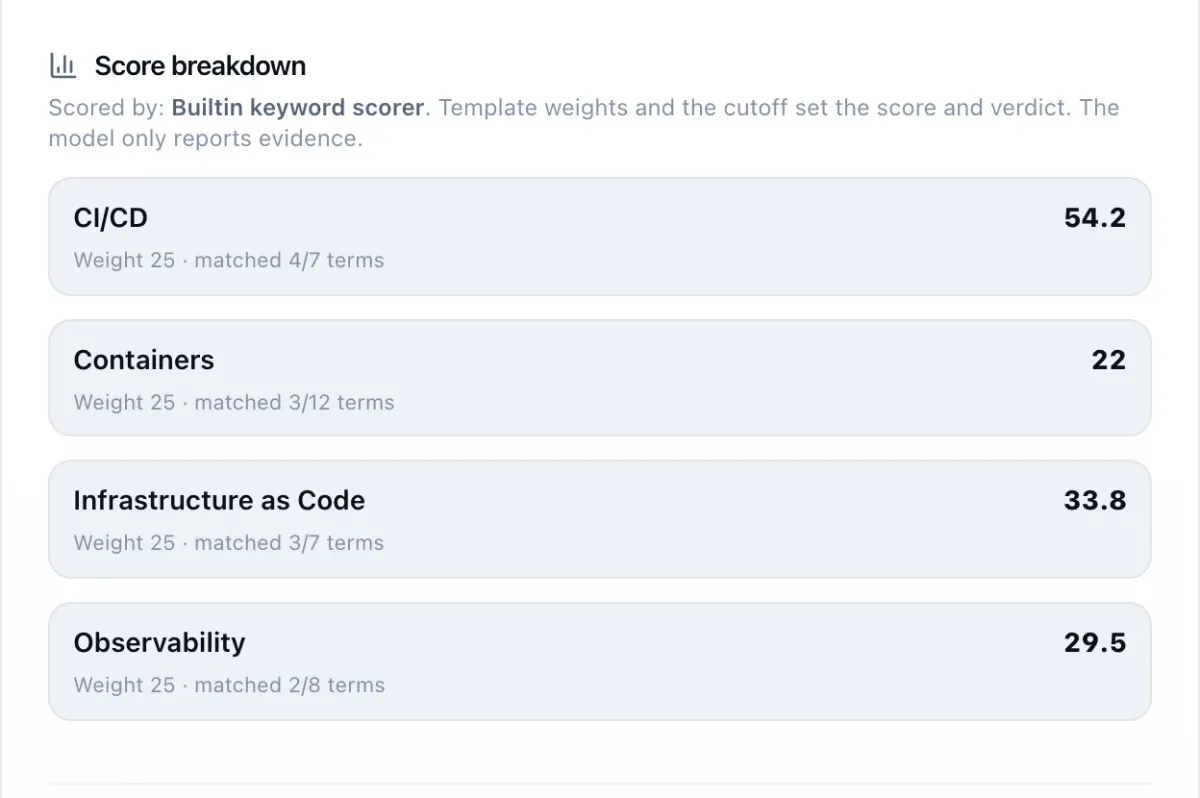
Scored by
Shows whether the built in keyword scorer or an AI model read this CV.
Weight and matches
The criterion's weight and how many of its terms the CV covered.
Points per criterion
What each criterion contributed. The total is compared with the role's cutoff.
Two ways to read a CV
Built in keyword scorer
On for every workspace. It matches each criterion's terms in the parsed CV and applies your weights. Fast, predictable, and free of per-screen cost.
AI screening, when you turn it on
Pick it per role. The model reads the CV and reports evidence for each criterion. Your template still sets the score and the verdict. Email addresses, phone numbers and street addresses are removed before the text is sent, unless you turn that off.
Use Anuva's AI key within your plan's monthly AI screens (Free gets one-time trial credits), or bring your own provider key. AI only reads CVs from candidates who agreed to it. Screens on your own key are counted but never limited.
People decide. The product is built to keep it that way.
A person decides by default
Shortlist and reject are human actions unless an admin chooses automatic decisions by cutoff. Reopening a rejection needs a reason.
Overrides are expected
Disagree with a score and override it with a written reason. The override is audited.
Unreadable files are set aside
Scanned or broken CVs go to a person instead of scoring zero.
Decision quality is measured
Reports track how often people agree with the score, the override rate and rubric drift.
Then clear the review queue from the keyboard
Screened applicants wait in one queue across roles. Press J and K to move, S to shortlist and X to reject. Each decision asks for a short reason for the audit trail. Select several to decide in bulk.
What happens after the shortlist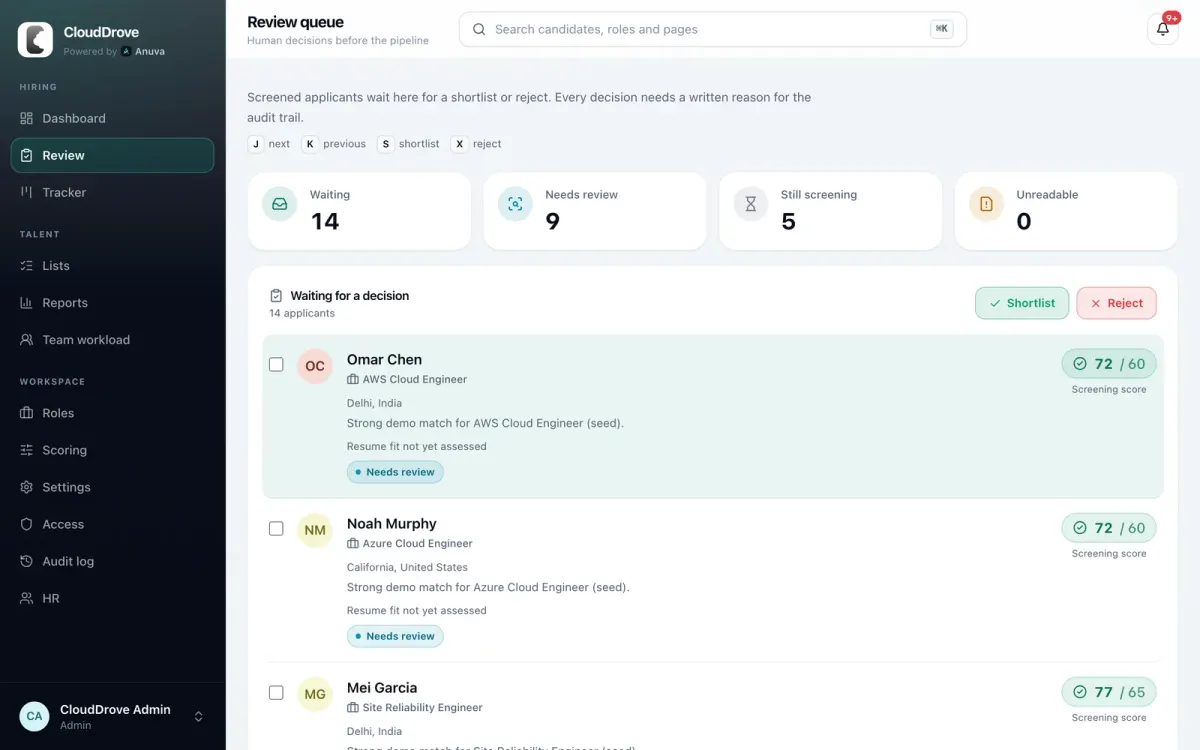
Screening questions
Something else? Write to hello@anuva.io and a person will answer.
How does Anuva score a resume?
Each role uses a scoring template: criteria with keywords and weights that add up to 100 percent, plus a shortlist cutoff. Anuva scores every CV against the template and shows the points each criterion contributed.
Does AI reject candidates automatically?
Not by default. Shortlist and reject are human actions unless a workspace admin turns on automatic decisions by cutoff. People can override any score with a written reason, and overrides are audited.
Do I have to use AI screening?
No. The built in keyword scorer is on for every workspace and has no per-screen cost. AI screening is optional and chosen per role.
What personal data is sent to the AI model?
CV text, with email addresses, phone numbers and street addresses removed before sending unless you turn that off. CV files themselves are never sent. You can also use your own AI provider key.
What happens to scanned or unreadable CVs?
They are set aside for a person to review instead of scoring zero.
Can an old score be explained later?
Yes. Every scoring run keeps a snapshot of the template it used, so a score can be reproduced and explained months later.
Score your next role the same way, every time
Book a demo and bring a role you are hiring for. We will walk through screening, the pipeline and reports with it, and answer security questions on the same call.
or email hello@anuva.io


