Your candidates' data, kept apart and kept accountable
Hiring data is personal data: CVs, salaries, interview notes, sometimes diversity answers. This page lists how Anuva handles it, in enough detail for your security review.
Isolation
A database per workspace
New workspaces get a dedicated Postgres database. A separate control database only maps each workspace to its own database.
Row level security inside it
Postgres row level security policies still apply inside each database. The application connects as a non-superuser role, so its queries cannot bypass them.
Careers traffic stays separate
The public careers site works out which company a request belongs to from the host name, never from a recruiter's session. Candidates never use the recruiter login.
No raw CV text in the database
CV files go to S3-compatible object storage with server-side encryption. The database keeps structured fields parsed from the CV, not the CV text. Downloads are served as attachments.
Access
Roles and permission sets
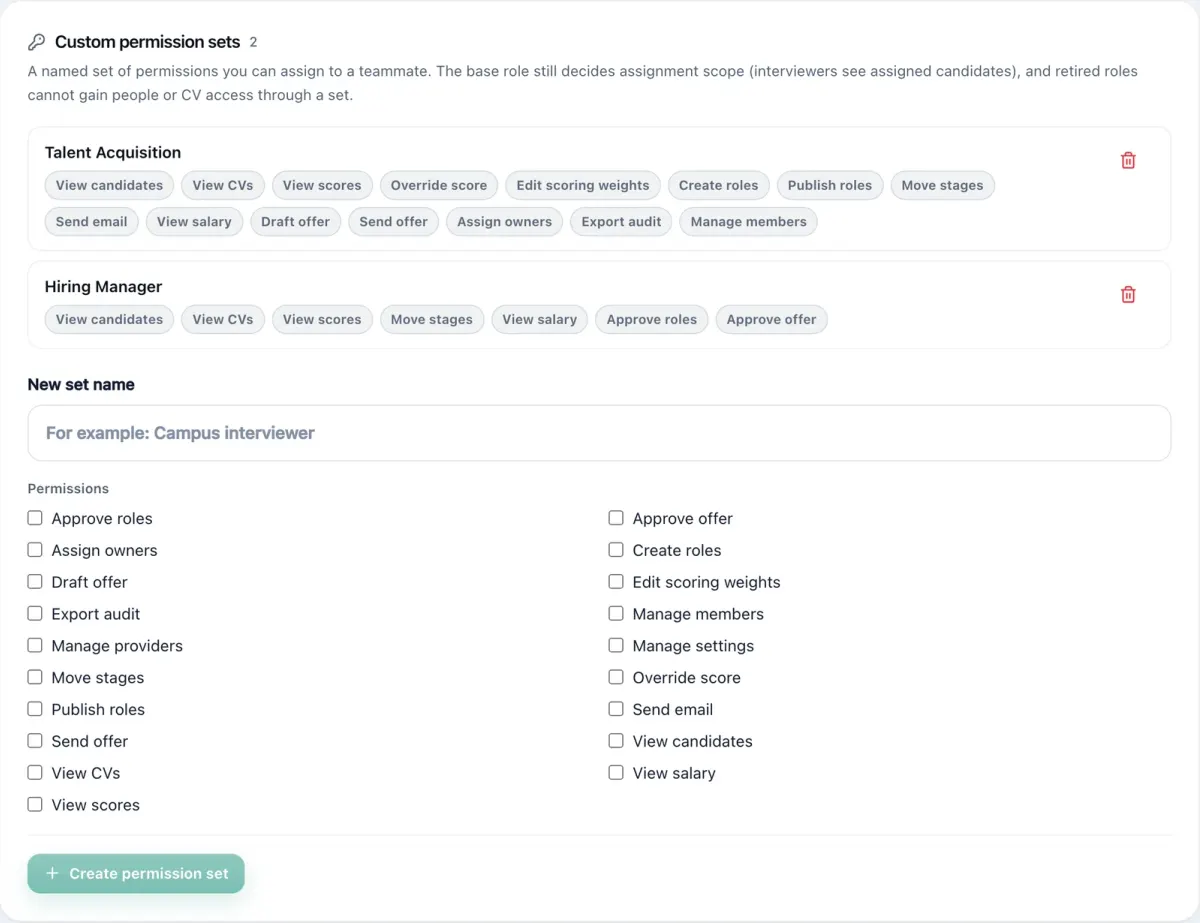
Admins and interviewers by default. Named permission sets, such as Hiring Manager, grant exactly the rights you tick: view CVs, view salary, override scores, draft, send or approve offers, export the audit log. Interviewers only see candidates assigned to them.
Enforced by the API
Permissions are checked on the server for every request, not only hidden in the interface. Refused actions are written to the audit log.
Sign in
Passwords need at least 12 characters with a letter and a digit. Sessions carry a unique token id and logging out revokes it on the server. Enterprise workspaces can require single sign-on through WorkOS.
Integrations
Webhooks are HTTPS only, signed with HMAC, and refuse private and cloud metadata addresses. API keys are off until an admin enables them.
Audit log
Overrides, stage moves, settings changes, invites, refused actions and exports are recorded with who did it, when, and where the request came from: city and country, network provider, device, operating system and browser.
Filter by action, choose a time window, and export to CSV for your auditors. Every scoring run also keeps a snapshot of the template it used, so a score from last quarter can be explained today.
Privacy tools
Candidate notices and consent
Candidates accept your privacy notice and choose separately whether AI may screen their CV and whether you may keep it for future roles. A candidate who says no to AI is never sent to an AI model. Change the wording, bump the version, and new consent is recorded.
Retention that actually deletes
Set how long CVs are kept, 12 months by default. A scheduled job deletes CV files and clears application data when the period ends, or deletes the candidate entirely if you choose.
Access and erasure requests
Log and track DSARs in settings. Completing an erasure clears CVs and sensitive fields for matching candidates.
Sensitive answers
Diversity questions are optional and off by default. Answers are restricted and shown as aggregates.
AI with less personal data
When AI screening is on, email addresses, phone numbers and street addresses are removed from CV text before it is sent, unless you turn that off. CV files are never sent. You can use your own AI provider key.
Candidate status links
A candidate's status page needs a long random token. It cannot be looked up by email address.
Documents
- Data processing agreementProcessor terms, security measures, breach notice, deletion
- Sub-processorsEvery third party, what it receives, and whether it is on by default
- Privacy policyHow Anuva handles personal data as a company
- Terms of serviceThe agreement for using Anuva
Need a security questionnaire answered or a call with the people who built it? Write to hello@anuva.io.
Leaving is easy
Admins can export the whole workspace as JSON at any time, and on Growth and Enterprise the full audit log as CSV. A workspace deletion request goes to the platform team, and on deletion the dedicated database and stored CV files are removed.
Bring your security questions to a demo
Book a demo and bring a role you are hiring for. We will walk through screening, the pipeline and reports with it, and answer security questions on the same call.
or email hello@anuva.io


